
For organizations running both Dynamics 365 CRM and Dynamics 365 Finance & Operations (F&O), a familiar gap shows up: activity is planned and recorded in CRM events, products, sales orders, and the line items within them while the financial side of the business lives in F&O. Someone has to keep the two in sync, or finance ends up reconciling records by hand.
For this client, the requirement went beyond events alone. Products, sales orders, and the individual order products within them all needed to flow from CRM into F&O on a reliable schedule, each kept current with F&O, and each backed by a clear audit trail if anything failed.
The Challenge
Every event, product, and order the organization creates in CRM has a financial side that F&O needs to know about - which department it belongs to, which cost center absorbs it, and how it should be booked. Without a dependable way to move that information across systems, finance is left working from data that is always slightly out of date.
Why This Sync Matters
When an event goes live or gets cancelled, when a sales order comes in, or when the products in it change, F&O needs to know not whenever someone gets around to it, but on a set, predictable schedule. That's the only way financial records stay in step with what's happening in CRM.
Without automation, this turns into manual re-entry, over and over, across every record type: someone has to check CRM for new events, new products, new orders, and their line items, then manually enter in F&O. That takes time, and every manual entry is a chance for a mistake.
The Approach: Workflow Scheduler
Rather than relying on an external scheduler, the recurrence was built out of the workflow engine's own building blocks a workflow that waits, runs, and then triggers the next cycle of itself. And rather than building a separate scheduler for every record type that needed syncing, the same pattern was built once and reused for each one.
Two custom entities carry the design
- Process Scheduler record: one per sync job. Each job is configured with its own type - Event Sync, Sale Sync, Product Sync along with its own frequency, last-run time, and next-run time. Adding a new sync job for another record type is a configuration change, not a new build for a specific type.
- Process Scheduler Session record: created fresh every time a job runs, acting as the trigger point for that cycle's actual work.
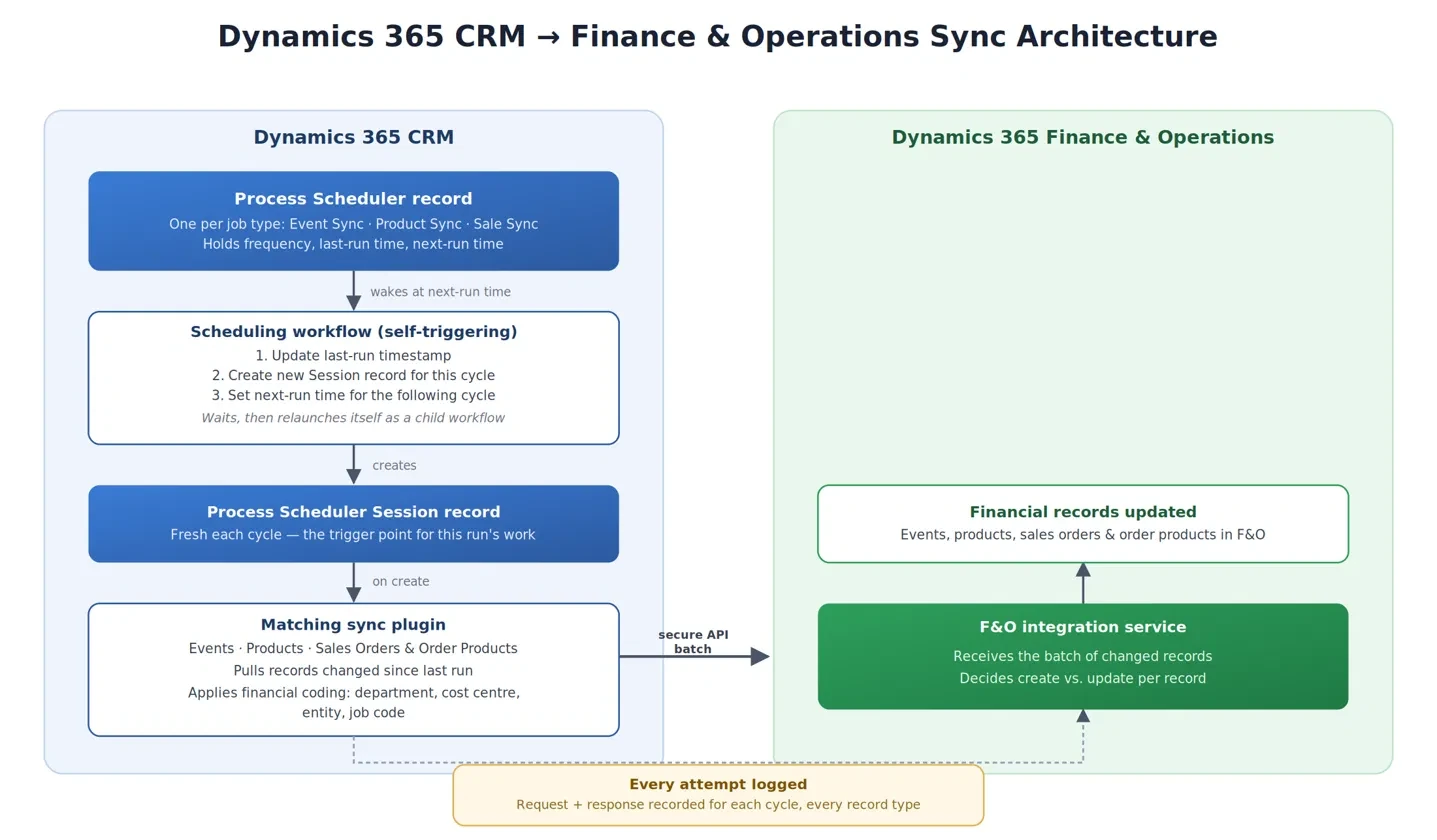
The scheduling workflow attached to Process Scheduler waits until its configured next-run time, then does three things in sequence: it updates the last-run timestamp, creates a new Session record for this cycle, and updates the next-run time for the cycle after that. It then waits for a further short interval and starts itself again as a child workflow - closing the loop. Each record type has its own Process Scheduler session record running this loop independently, so events, products, sales orders, and order products each sync on their own separate schedule, at their own frequency, with no dependency on one another.
Creating each Process Scheduler Session record is what actually kicks off the work: a second workflow, triggered the moment a new Session is created, checks which type of job it belongs to and calls the matching plugin — one that syncs events, one that syncs products, one that syncs sales orders and their order products — each pulling the relevant records changed in CRM and sending them to F&O.
How the Sync Runs End to End
- Each record type's recurring workflow wakes up on its own schedule and creates a new Session record for that cycle.
- The Session triggers the matching sync plugin events, products, sales orders, or order products which look up every relevant record changed in CRM since that job's last run.
- Each record validated with required fields like department, cost centre, entity, and job code the information F&O needs.
- The batch is sent to F&O over a secure, authenticated API call, packaged as a single request covering every changed record from that cycle.
- F&O's own service determines what to do with each record creating it if it's new, updating it if it already exists.
- Every attempt is logged, request and response together, in a dedicated logging record so if a call to F&O fails, there's a complete, reviewable trail of exactly what was sent and what came back, without anyone needing to dig through server logs.
Outcome
Events, products, sales orders, and order products now move from CRM to F&O automatically, each running on its own independent schedule at its own frequency, without any manual re-entry. Finance sees current records with the correct coding already applied, and every sync attempt — across every record type — is logged for review, so if something ever needs investigating, the evidence is already sitting in the system rather than needing to be reconstructed after the fact.
Conclusion
- Recurrence doesn't necessarily require a separate scheduler service.: A workflow that re-triggers itself after each cycle can deliver the same dependable cadence as an external scheduled job, using only tools already inside the platform.
- Let the receiving system own the create-vs-update decision.: By having F&O decide whether an incoming record is new or existing, the CRM side never has to track or guess what F&O has already seen which keeps the sync logic simple and avoids duplicate records.
- Log the exchange, not just the outcome.: Recording what was actually sent and what came back for every cycle, across every record type turns “did the sync work?” from a support investigation into a quick lookup.